Suppose a manufacturing company switches on the AI features in Odoo 19. The first week goes well as the AI assistant answers the team’s questions from the company knowledge base & the operations director is pleased. She decides to move to the second step. The request is, how many items are consumed in each manufacturing project with specifications?
That request is the gap where the project changes. The answer depends upon custom fields, customer details & specifications that exist only in the company’s own setup. The company asks two agencies for a quote. One says $15,000, and the other says $40,000 & no one explains the difference.
If this sounds similar to your business, decide between using Odoo’s built-in AI & building a custom Odoo AI module. This blog walks through what a custom module actually contains, how it is built, and at what cost.
Do You Need a Custom Module For All?
The answer is sometimes & less often than a vendor quote suggests. Odoo 19 includes various AI features, including AI agents, AI server actions & AI tools. Many businesses are configured with prompts, knowledge sources & topics, as they need configuration, not a module.
A custom module becomes a worthwhile investment in four different situations, including:
- Odoo 19 natively supports OpenAI & Google Gemini, & connecting other providers means customization or middleware that your team owns.
- Standard tools cannot clearly explain the business agenda. There are various parameters included, i.e., pricing, approvals, or compliance checks that must run before AI action.
- Control business needs & improve them in a better way on what AI can actually read, audits & spending limits.
- Workflows span systems if it’s not genuine. Odoo has to exchange data with the marketplace or a legacy tool before the AI answers.
If none of the above situations apply, go for built-in agents & server actions. The same applies to Odoo customization, giving the system a genuine trial and letting them decide what to build.
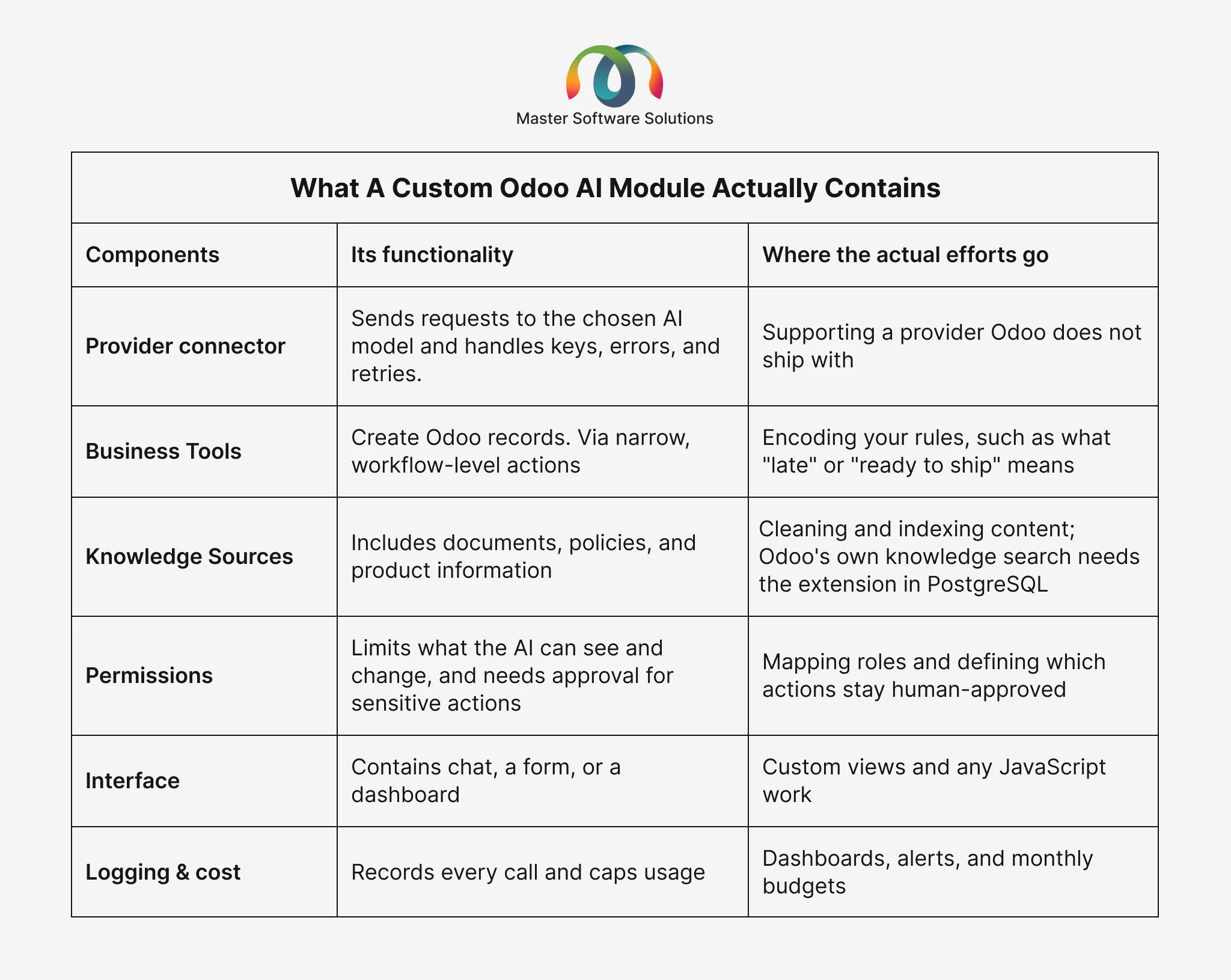
What a Custom Odoo AI Module Actually Contains
A custom Odoo AI module combines a few parts to create the best sequence that businesses are looking for. A quote becomes easier to identify when you know what’s inside it.
Parameters to be Considered When Building a Custom AI Module
The major parameters are requirements, environment, structure, code, interface testing & deployment, which every business should consider when moving forward with customization.
Define one use case & its success outcome
According to your business objective, define one use case in detail with its working, functionality, features, cost, & more to get a clear understanding of AI content & prompts.
Audit AI Data
AI data is not always genuine. Missed lead times, duplicate partners, and inconsistent product names all produce confidence in assumptions. Fix them before building.
Choose the model and the architecture
Decide which provider to use; highlight sensitive fields to get the correct answer & also specify whether you are choosing a native framework or a separate connector. If Claude is the model, it’s important to understand Odoo-to-Claude integration via the MCP server to get more clarity.
Build the tools, then the obstacles
Move forward with read-only tools and accordingly take the next move. Hold off on deleting records & posting entries until the system proves itself.
Test on staging with real questions
Use 50 to 100 questions your team asks, including informational & conversational ones & check the answers against the Odoo data. Never go with an untested module to a live database.
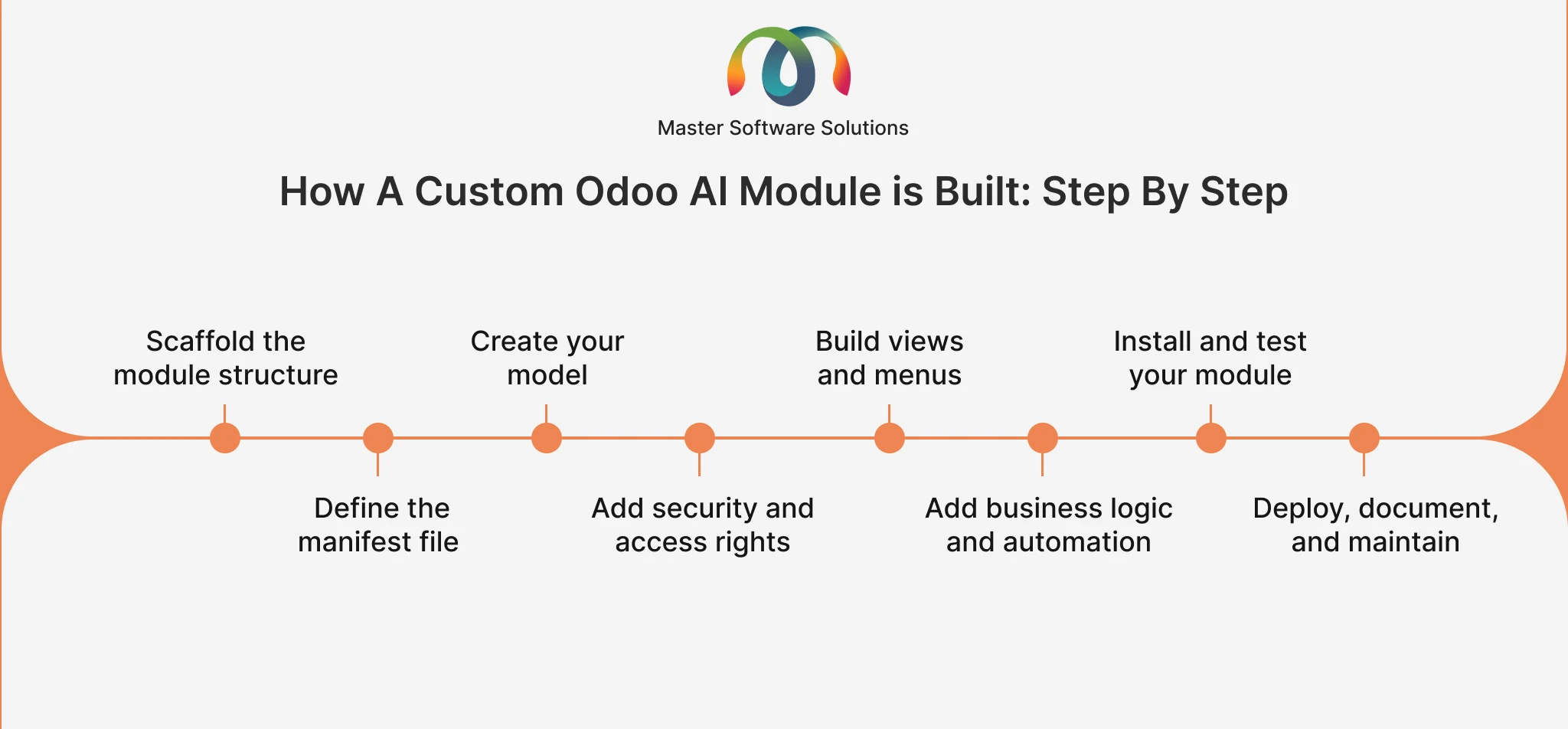
How a Custom Odoo AI Module Is Built: Step by Step
1. Scaffold the module structure
Use Odoo’s scaffolding command to generate a structure with folders for models, views, security, and data.
2. Define the manifest file
The manifest file showcases the Odoo apps it depends upon & lists the data files Odoo needs to load. This step makes sure what data AI will read & install.
3. Create your model
An AI module needs models for its settings, such as the chosen provider and usage limits, and for a log that records each request, who made it, and what it cost.
4. Add security and access rights
Set access controls and add record rules so users only see what they need. This step specifies what the AI can read and change, with limited permissions, and keeps sensitive records out of its reach.
5. Build views and menus
Define the list, form, and search views, plus the menus and window actions that expose the module.
6. Add business logic and automation
This is a major factor in how the AI behavior is built. Start with read-only tools and add actions that write records only after testing.
7. Install and test your module
Restart Odoo with the new addon path, update the apps, and test as a non-admin user to confirm that access and workflows behave correctly.
8. Deploy, document, and maintain
Keep the module in version control, stage it before production, document your decisions, and review it with each Odoo upgrade for best outcomes.
Want to explore in detail the step-by-step process of how to build a custom Odoo AI module, covering all the steps & what’s a major difference between Odoo Studio vs. custom module development?
What It Actually Costs in Numbers
Cost is the major parameter that should never be overlooked, as it covers four separate things that include:
The build
There is no official price for Odoo customization; it entirely depends upon the business needs & criteria. According to complexity, size & planning, cost fluctuates. Prices vary as per customization, including integration, business logic, security & testing.
Running cost of the AI model
This is the cost that most businesses ignore. AI providers charge by usage, not by flat subscription. The bill depends on how many people use the AI assistant & how much data each request carries. Set a monthly usage limit & track the spending from the first day.
Maintenance and upgrades
Custom code follows Odoo releases, & modules built on Odoo standard extension points are easier to carry across versions.
The hidden cost
The work that rarely shows up in a quote: cleaning the data the module relies on, testing it against real questions, and training your team to use it. It is mostly a one-time effort, but skipping it is what makes answers unreliable later.
Why AI-Powered Module Projects Fail
Money is not always the risk, but sometimes execution is too. According to Gartner, 50 percent of generative AI projects are abandoned after the proof of concept stage, and the causes are lack of business value, poor data quality, and inadequate risk control.
For an Odoo AI module, it means defining one clear use case, clearing the data the module relies on, setting a usage budget, and agreeing on guardrails before development starts.
Questions to Ask a Partner Before You Sign
- Can customization be done with Odoo’s built-in AI agents, and if not, why not?
- Which parts of the quote are one-time and which repeat monthly or yearly?
- What are the expected model usage costs as per volume?
- What does AI read and change, and which major actions need human approval?
- How will the module survive our next Odoo upgrade?
- Should we hire an in-house developer or an integration expert for ongoing changes?
Conclusion
A custom Odoo AI module is worth building when it solves one clearly defined problem that Odoo’s built-in AI cannot handle & when the business understands all four costs: the build, the model usage, the upgrades, and the hidden work. A module that skips any of these parameters may look affordable at the start, but the costs later include usage bills, upgrade work, and time spent on data and testing.
Master Software Solutions is a reliable Odoo Silver partner, headquartered in Canada that helps businesses decide what to configure, what to customize & what to build for reliable outcomes. We come up with clear timing & running costs to build a custom Odoo AI module. Connect with our team about the real use case & explore our Odoo module development services.