It’s Tuesday morning & the finance manager of a mid-sized business opens Claude & types, which customers have overdue invoices from last month? Within seconds, a complete list of records appears, pulled live from Odoo. No spreadsheets & no manual reports, just automation.
After some time, the operations lead wrote something bigger, i.e., “reorder everything below minimum stock with costing”. That is where most Claude MCP projects with Odoo win or fail. The technology is not an issue; it’s basically MCP that gives Claude a standardized way to connect with the business software. The difficulty is that Odoo is not a single database. Sales, inventory, and accounting run on a unified connected platform and share the same live data, so a change in one objective, such as confirming an order, can affect others. It’s important to weigh where to integrate Claude MCP with Odoo to get the desired outcomes. This blog walks through the challenges businesses actually run into & why they matter.
What is Claude MCP & Why it Matters for Businesses
Model Context Protocol (MCP) is an open standard that gives AI models like Claude one consistent way to connect to tools and business data. Before MCP, every link between an AI assistant and a system required its own custom integration. With MCP, a system comes up with its capabilities, and Claude uses them the same way every time to work with real-time business data.
For businesses, connecting Claude with Odoo needs permissions, approvals, and logging setup so that it works with other AI tools. The MCP project reports close to half a billion SDK downloads a month across its main SDKs. It does not provide accurate results on its own, so the quality of the tools & access grants matters.
Why Connecting Odoo to Claude MCP Is More Complex Than It Looks
Odoo ERP encapsulates data on sales, inventory, accounting, HR & manufacturing in a unified platform & a single action rarely stays inside one module. Here are some main reasons that make the integration difficult.
- A single action has many effects because modules depend on each other. Each tool has to account for what it sets off in other parts of the system.
- No two Odoo setups behave the same. Custom fields, renamed stages, and company-specific approval rules mean the same tool can give different results in various businesses.
- The data is deeply linked with Odoo. Orders, invoices, and stock movements are connected via layers of related data & turning that into a simple, reliable structure.
- Automation runs behind the scenes. Many Odoo actions, like validations, calculations, and follow-up processes, are done automatically, which is harder to justify.
What Businesses Struggle With When Integrating Claude MCP with Odoo
The connection is the easy part, but these four challenges determine what businesses go through.
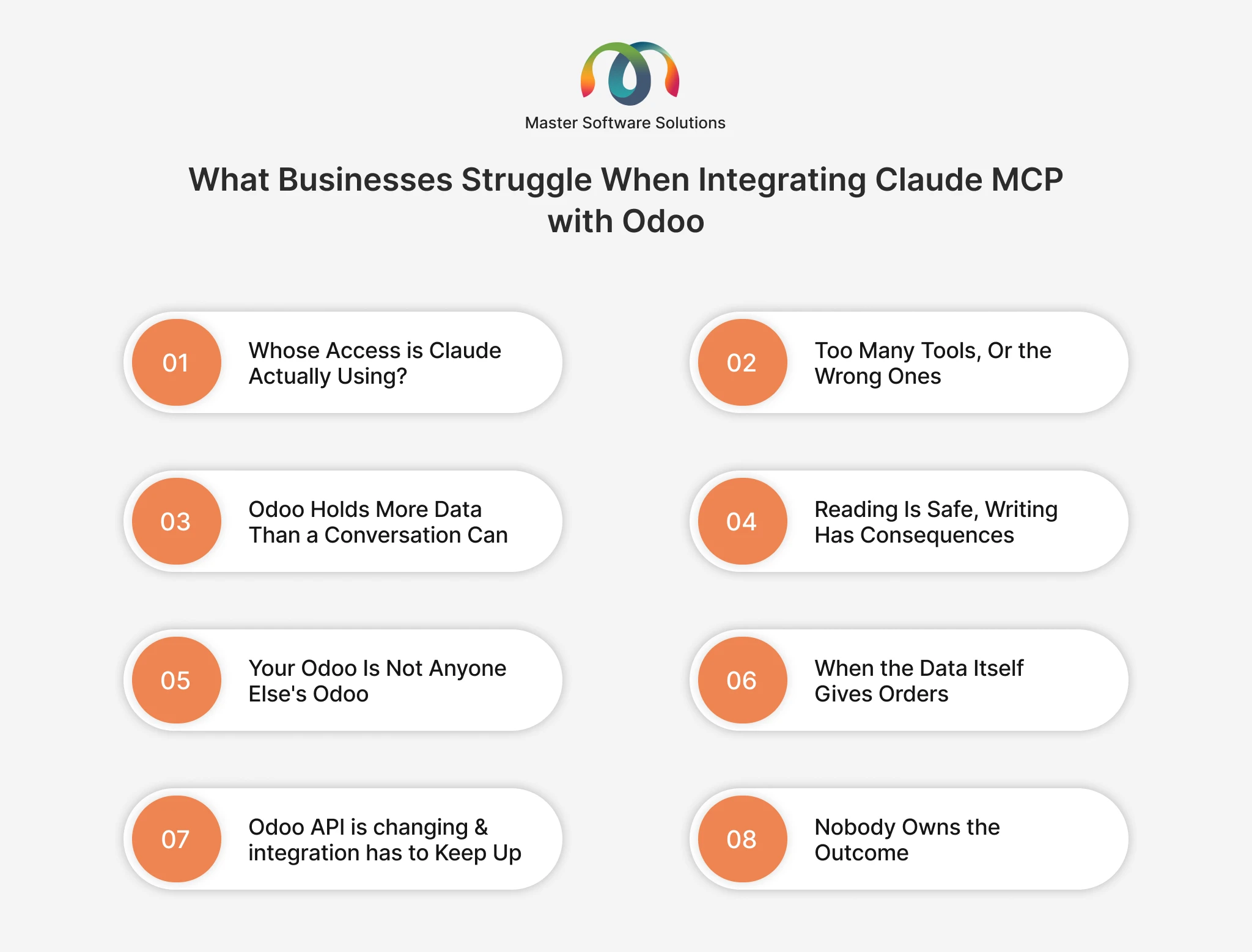
Whose Access Is Claude Actually Using?
Every action Odoo MCP runs under a specific user account needs permissions for what Claude can read and change. If the user account is an administrator, Claude has access to every module, including payroll, margins, and customer data. A wrong prompt does not provide the real information the user is actually looking for. Access is a major decision you make on the basis of purpose.
The safer approach is to design access before connecting anything:
- Create a dedicated Odoo user for Claude, separate from any staff or administrator account.
- Limit that user to the modules and record the first use case needs.
- Start with read-only access, and add write access only after the team trusts the results.
- Require human approval before any change reaches production records.
This is the complete setup for connecting Odoo to Claude through an MCP server. Always start with low-risk operations and add access only when there is a particular task to eliminate the risk of attackers.
Too Many Tools, Or the Wrong Ones
Teams often start by exposing every Odoo model as its own tool, including one for partners, one for products, one for sales orders, and so on. It’s not the right choice for businesses that are looking for growth & productivity. Eventually, it leaves Claude choosing between many options to execute a multi-step process.
According to Anthropic’s own guidance on building tools for agents, they found that there are few thoughtful tools for high-impact workflows; not every tool is reliable to connect, as when explaining a job to a new team member.
For Odoo, a tool to find overdue invoices for a customer is more reliable than raw access to the invoice table. The first step is how your business analyzes the task & secondly, it leaves Claude guessing which fields, filters, and states are necessary.
Odoo Holds More Data Than a Conversation Can
Every record a tool passes via Claude context window is of fixed size with no changes. An Odoo database can hold thousands of orders at one time, so a complete query can fill the window & leave little space for reasoning.
What to build in:
- Filter and summarize inside the tool, so Claude receives the exact data like “top ten overdue accounts” and not ten thousand invoice lines.
- According to results, set default limits on every query.
- Load the tool only when needed, and process a large volume of data.
Reading Is Safe, Writing Has Consequences
Reading a record changes nothing, but writing can definitely change the set of events at a time.
In Odoo setups, confirming a sales order can only create deliveries, reserve stock, and affect invoicing reports. Whereas, a purchase order can trigger approvals & update expected receipts, which are greatly effective. One AI-initiated change is just one change; that’s why read-only is just for sequences, not a caution.
Genuine setups follow just three rules:
- Draft first and approve second: Claude creates records in a draft state, and a named user confirms them.
- Keep destructive actions out of scope, that includes deleting, cancelling, and posting accounting entries, which should stay off the tool until the team has reviewed the context.
- Analyze every write-up, record the conversation & move forward with what Claude sent and what Odoo changed.
Your Odoo Is Not Anyone Else’s Odoo
Two companies on the same Odoo version can have very different databases & Odoo customization fills the gap over time. Custom approval fields, renamed stages, and industry modules are invisible to a generic MCP connector when your desired tool is not able to see a business objective. Due to this, Claude fills the gap with assumptions, and the answers are still sometimes accurate.
How to close the gap:
- Define your business objective in writing: what you need, whether it’s stocks, payments, or quality checks.
- Build the right definitions according to the tool logic, so that the business agenda lives in the integration and not in the model’s guess.
- Expose custom fields and stages, and test the tools against your real data before launch.
When the Data Itself Gives Orders
Odoo stores text that includes customer emails, helpdesk tickets, and supplier product detailed descriptions. When Claude reads that text, it will move forward with the instruction rather than the content. The OWASP MCP Security Cheat Sheet comes with two different threats, i.e., tool poisoning, where inappropriate instructions hide in tool descriptions or responses, and prompt insertion, which moves sensitive data out through normal tool calls.
OWASP’s recommended controls that apply to Odoo
- Treat everything a tool returns as data, never as instructions.
- Odoo Claude server requires a clear response for sensitive operations.
- Log every tool with its parameters.
- Give Claude read-only access and few simple tools, so a bad prompt can’t reach much or change anything.
Odoo API is changing & your Integration Has to Keep Up
Many early Odoo connectors were built on XML-RPC or JSON-RPC, and Odoo is replacing both with a better one. These Odoo connectors are not introduced in the Odoo 19 version. Odoo 19 features are not carried forward in Odoo 20. It’s necessary that your data can be easily integrated with any new version without any errors or disputes.
What this integration means for businesses
- Check which endpoints your connector uses today, as one built on the older ones will stop working at upgrade time.
- Plan for API key expiry and rotation, since an expired key directly switches off the data your team relies on.
- Include the integration in your upgrade plan before planning the next jump.
Nobody Owns the Outcome
The projects usually fail because of planning and ownership problems, not because the technology doesn’t work. According to Gartner, over 40% of agentic AI projects will be canceled by the end of 2027. There are three major reasons: rising costs, unclear business value & no proper control of risks.
Three things protect an Odoo and Claude project:
- A named owner, such as an operations or finance manager, who is accountable for the integration’s results, budget, and permissions.
- One clearly defined use case, whether it’s accounting, invoicing, or manufacturing, should be constructed to give AI direct instructions, business needs, & objectives.
- A successful measure is defined before the build, such as specifying time, number of reports, or checking accuracy against Odoo records.
Readiness Check Before You Connect Claude to Odoo
Before connecting Claude to Odoo, businesses need to answer a few questions that include:
- A dedicated Odoo user for integration, with the permissions for the first use case.
- The first use case is read-only and includes reporting, complete write-ups, or summaries.
- Tools are designed according to the business tasks, with filtering and sensible result limits.
- The write-ups are drafted and approved by a named person, and every call needs to be logged.
- The integration is mapped to your Odoo version and upgrade plan to move further with evolving needs & challenges.
For a broader look, read the blog on Top Odoo ERP integrations every growing business needs to eliminate guesswork & how the right Odoo integration turns a collection of disconnected apps into a single source of truth.
Conclusion
Integrating Claude MCP with Odoo is not complicated, but connecting it in the right way as per business goals is the major concern. Businesses get value only if it is evaluated by the team to take further action. Giving the right prompts & getting worthwhile answers is the major focus of connecting Claude to Odoo, not an assumption-based approach.
Master Software Solutions is the trusted Odoo Silver Partner that enables businesses to make Odoo & Claude integration a success. Whether it’s customization or integration services, we cover everything to widen the scope of what businesses run on. Talk to our team to get the right suggestion.
Are you ready to connect Claude to Odoo rather than guessing? Our team helps you start with a scope, as well as read-only commands, for accurate results.