A mid-sized distributor has a call with their Odoo partner to create a feature that usually takes a few weeks of custom development. The last month’s sales data need to be fetched, the client follow-up email checked, and the invoices at risk identified. The entire request goes to the development queue, consumes time, & affects the client deadline. Today, Odoo can configure that natively, helping businesses raise the same question with their implementation partner before development even starts.
The AI shift from a buzzword integrated into the software to a working part of Odoo development is actually what’s changing Odoo right now. According to Globe News Wire, it’s reported that 90.6% now use AI-powered tools somewhere across their development lifecycle. From native AI agents to custom LLM integrations, businesses connect Odoo to LLMs like ChatGPT, claude to handle business processes & operations to increase efficiency, productivity & futuristic outcomes.
How AI Is a Beneficial Gain in Odoo Development
AI is not replacing work; it helps in building & running Odoo. It serves as a middleware between the developer & operations, helping businesses gain the full advantage of Odoo AI development
Create Faster module structure
Generating a module’s manifest file, model structure, and field definitions are repetitive tasks that are done manually every time. AI is a great advancement that drafts the template from a plain-language description, giving developers a starting point.
Before AI drafts a new one, it helps to know what’s already built into Odoo. Our guide on the key modules in the Odoo ERP system breaks down Sales, Inventory, Accounting, and the rest, so you’re extending the right module instead of duplicating one that already exists.
Natural-language to XML views
Building the tables, lists, forms, fields & Kanban view (a visual project management tool that organizes tasks, projects, or records ) means writing by field every time. AI creates the first draft of that interface from a description to a clearer one, enabling businesses to get the accurate structure.
Smarter ORM query assistance
Odoo ORM comes with its own convention for filtering, joining, and computing fields. AI is trained on every type of pattern and helps in structuring complex queries correctly from the first time. This cuts down on trial and error when dealing with relational data.
Fewer custom development requests
This is the biggest gain that AI provides. It directly handles the requests that are required for developers, summarizes pipeline data as well as responses. This shifts developer time toward the work that genuinely needs it.
Faster debugging and legacy code understanding
When a developer inherits someone’s module with no documentation. AI summarizes the piece of code & where it needs to be fitted, eliminating time consumed in making changes to code.
Quicker upgrade and migration reviews
Every Odoo release means analyzing old customizations against new API’s before it breaks. AI speeds up that review so that developers know exactly what needs attention instead of testing the entire module.
Automated test case generation
Creating test cases for every model, view & workflow is a major step that gets skipped when deadlines are tight. AI generates the initial set of test cases directly from the module’s models & business logic.
Real Use Cases for Odoo AI Development
These aren’t just capabilities, but are framed as specific tasks businesses are handing off to AI inside their Odoo ERP software. Here are some of these:
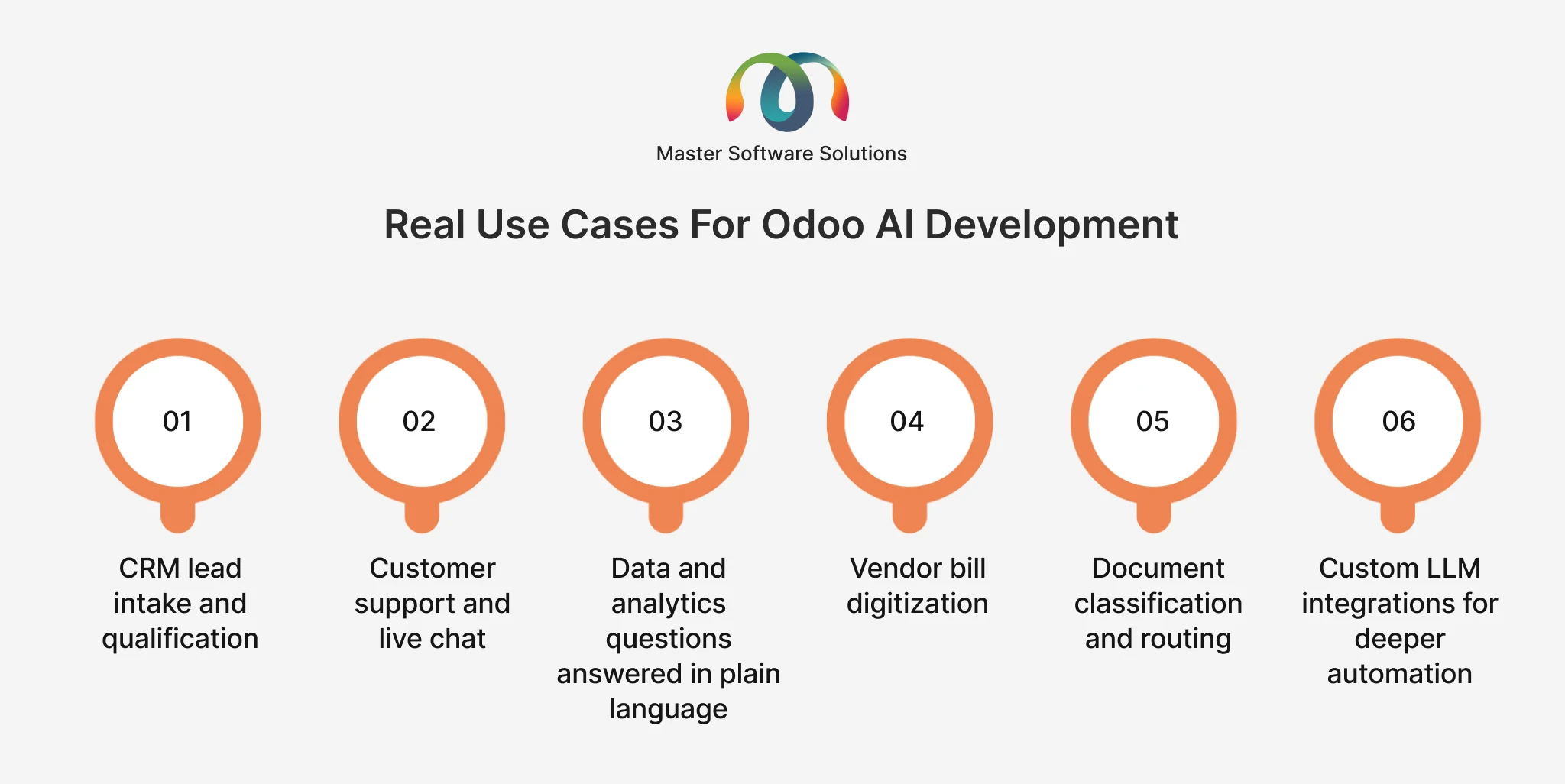
CRM lead intake and qualification
A native AI agent reads an inbound message, extracts the relevant details, and creates a qualified lead in CRM without manual sales intervention.
Customer support and live chat
AI Agents connected to the website’s live chat can answer common questions by retrieving information from a business’s own documents and knowledge base. If the AI agent is not able to answer or the question goes beyond AI access, the answer is moved to a human.
Data and analytics questions answered in plain language
Odoo 19 comes with a built-in “Ask AI” feature that helps users ask a direct question, like what’s the sales number in the last 2 months, create the table for the demand of sales as per orders & many more. The answers are directly pulled from real data, without creating a custom report.
Vendor bill digitization
OCR (optical character recognition) with AI extracts vendor details, line items, and totals directly from a supplier’s PDF invoice. This cuts the manual effort for the finance team with real-time visibility.
Document classification and routing
Files will be automatically sorted within the document app based on the content as well as incoming paperwork. This helps businesses land the right operational folder without manual intervention.
Custom LLM integrations for deeper automation
Where native AI agents fall short, connecting Odoo to Claude or ChatGPT via custom integration opens up advanced use cases that include automated invoice reconciliation, demand forecasting from historical sales data, and drafted executive summaries.
Want to understand integrating Odoo with Claude AI? Our guide helps you understand how integration is built & delivers the most value to businesses.
Major Challenges in Odoo AI Development Where Human Expertise Matters
There are some limitations and risks worth knowing before adopting either native agents or custom integrations. Let’s go through the challenges.
Version confusion in AI-generated code
AI tools are trained based on multiple Odoo versions & a mix of API’s generated code may seem correct, but the major agenda is missing in the version being used. Every AI-assisted change still needs to be checked against the target version.
The black-box risk
Proceeding with AI-generated code without understanding what it does & finding the real problem across the database, access rights & business logic. AI definitely reduces the effort, but does not meet developers’ understanding of what was built.
Security gaps in generated code
AI-written code can include improper SQL or insufficient scope across rights. It’s another reason that is pointed out. There should be proper verification by humans to ensure complete certainty and avoid disputes or errors.
Native AI agents can’t do everything
Native AI agents do not perform every task. Odoo’s AI agents are read-only unless specific write tools are explicitly assigned to them. They only respond when asked or run on a schedule. Businesses expect fully autonomous, event-triggered automation from native AI that only focuses on functionality.
LLM provider lock-in
Odoo native AI features are built around CHATGPT, Gemini, on-premises, or Odoo.sh deployment that needs your own API key. Businesses looking forward to use a self-hosted or open-source model require custom integration rather than native configuration.
Data exposure and governance
Any AI feature that reads business data, whether native or custom, needs a clear answer to where that data goes, what the LLM provider retains & who inside the business can configure. These are the governance compliance requirements that need to be checked before rolling out to other sections.
AI-Powered Odoo Development Workflow
This Odoo AI development workflow creates a difference between configuring AI & What it actually provides.
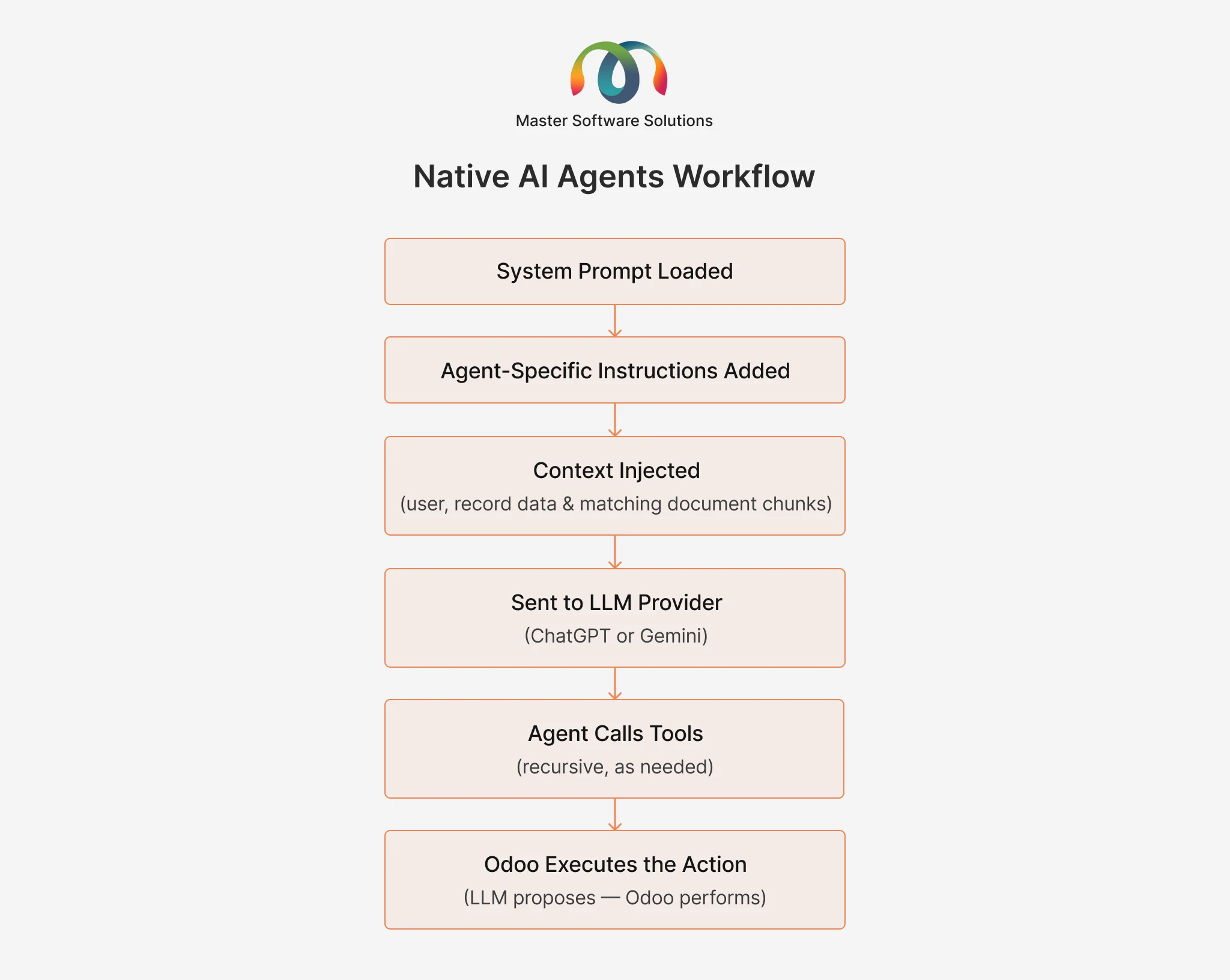
For native AI agents
For native AI agents, the system prompt, agent instructions, and relevant context (user, record data, and matching content) are assembled first, along with the user message, before the whole process moves forward to the LLM provider
LLM only proposes that action; Odoo ERP Implementation itself executes to keep everything inside system permission & validation rules.
For custom LLM integrations
In custom LLM integrations, the user action or event triggers a workflow, and information is provided from the relevant record or module. The action is further sent to the external LLM’s API (Claude or ChatGPT and that software generates the response, which is routed to a human for review first & then proceeds. Next, the process will be the same as above to propose the user query. This entire workflow is typically built through Odoo module development, since connecting Odoo to an external LLM isn’t a native configuration option
Our comparison of ChatGPT vs. Claude for Odoo AI integration is often the starting point for that conversation, since the right model depends on the use case.
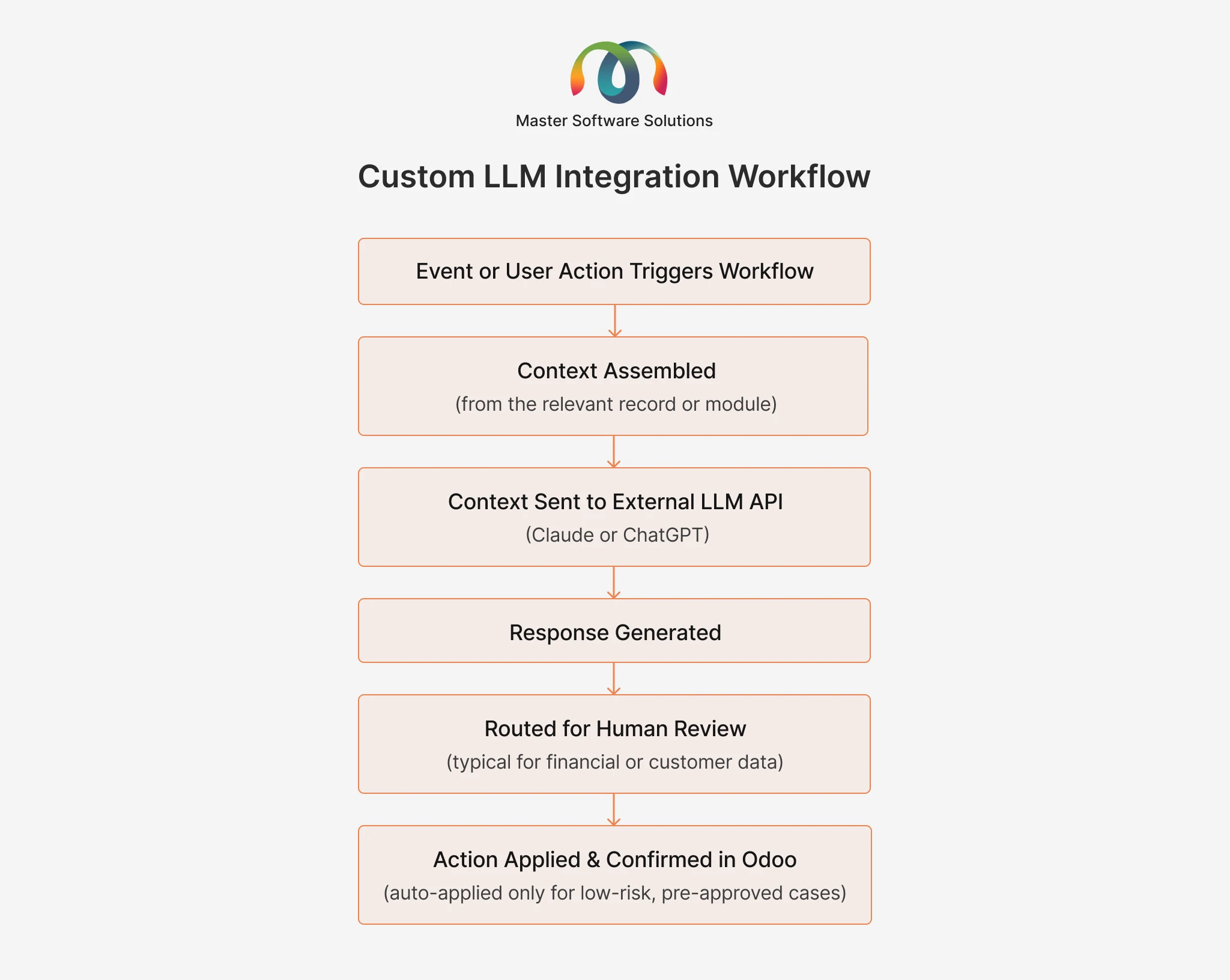
Both workflows point to the same underlying principle: AI proposes, generates, or drafts, and a defined system, whether that’s Odoo’s own execution layer or a human reviewer, decides what actually happens.
How Master Software Solution Integrates AI in Odoo Development
Master Software Solution is your trusted Odoo silver partner headquartered in Toronto, Canada, and specializes in providing built Odoo ERP implementation services that include consulting, implementation, migration, integration & website development. Plugins hold AI. We also build Odoo plugins that include AI functionality; you can download these plugins from the Odoo App Store or directly connect to our consultant to choose the right solution for your business.
Implement & customize Odoo to improve your business efficiency and productivity. Discuss your business with our ERP experts and get a free quote.
Conclusion
AI is transforming Odoo in two distinct ways, i.e making the platform itself smarter with native agents & taking actions within defined limits. It changes the business point of view by serving faster scaffolding, faster debugging & fewer manual steps. Getting value from Odoo AI development is understanding which problem you are actually solving & configuring what’s native where it fits, and reserving custom LLM development for what genuinely needs it.
Confused about Odoo native AI agent, a custom LLM integration, or both? Our team of consultants helps you discover the right choice based on your workflows.